
Identity attacksurface managementfor Microsoft, AWS,and GCP clouds.
Shrink your identity attack surface. Permafrost finds every human and non-human identity, scores the gap between the access it holds and the access it actually uses, then walks the risky grants back. No standing write access to your clouds.
Built for security engineers and cloud architects running Microsoft 365 and Entra ID, with AWS and GCP estates on the same pane.
Microsoft Entra ID and Azure — available now · AWS and GCP — in preview
Demo is read-only · synthetic data · no sign-in
How scoring worksRead-only OAuth · Zero stored credentials · Zero standing write access
Six questions your leadership will ask.
Permafrost answers each one with an outcome, then shows the evidence behind it. The mechanism — the score, the inventory, the findings, the walk-back — is proof below, not the pitch.
What risk are we carrying right now?
Most granted permissions are never used. Every unused entitlement is standing attack surface, so Permafrost ranks the gap and you cut the blast radius of any single compromised identity.
How exposed are we at the next audit?
Least-privilege evidence and remediation history, mapped to the access each identity actually uses. Fewer findings, and a defensible answer for every one that remains.
Which attack paths can we eliminate?
A ranked view of the identities holding more access than they exercise, human and non-human, so you close the paths an attacker would ride first.
How much operational effort does this take?
Access reviews backed by usage evidence instead of spreadsheet guesswork. Each quarterly review becomes a filter-and-confirm pass rather than a from-scratch investigation.
Does this lower our cyber-insurance risk?
A documented least-privilege posture and a shrinking attack surface are the controls underwriters ask about. The evidence to show them is generated from the access identities actually use.
Can we automate our compliance evidence?
Export least-privilege evidence and remediation history an auditor can read, produced from real usage rather than re-gathered by hand each cycle.
The board-level view in four numbers.
What a sponsor checks at a glance: how many identities are under management, how much of the estate is non-human, how many findings are ranked, and where the attack-surface score sits. Each opens the view it was counted from.
Representative demo tenant — illustrative, not an audited customer metric.
Less standing access. Smaller blast radius.
The unused half of every identity’s access is risk you carry for no return. Permafrost turns that gap into a shorter, evidence-backed path to least privilege.
Before — Access drifts
- Permissions granted at project start and never revisited.
- Quarterly access reviews run from spreadsheets, taking weeks.
- Service principals, managed identities, and agents multiply unscored.
- An auditor's request to prove least privilege lands as a fire drill.
After — Access is earned
- Every identity scored on the gap between access held and access used.
- Reviews become a filter-and-confirm pass over usage evidence.
- Non-human identities ranked alongside users, classified by origin.
- Least-privilege evidence is a query result, ready for the audit.
AI agents are accelerating the standing-access epidemic.
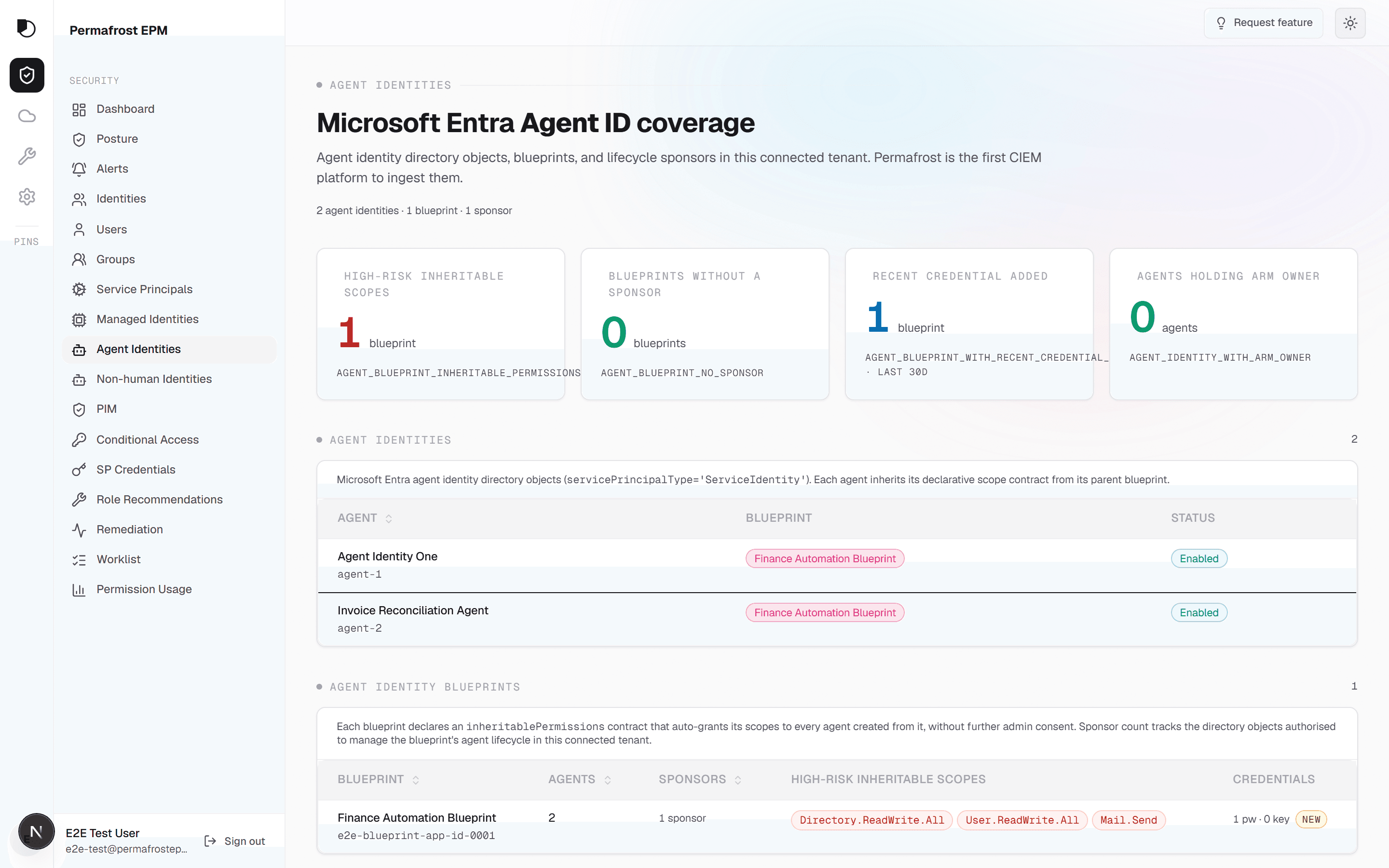
Agents act under their own credentials, collect broad grants to get a job done, and almost never get reviewed afterward. Permafrost discovers every agent identity, classifies it by origin, and scores it on the same granted-versus-exercised axis as your users — so a new class does not become a new blind spot.
Two outcomes a budget gets approved for.
Compliance evidence that generates itself, and a least-privilege posture you can put in front of an underwriter. Both come from the same place: the access your identities actually use.
Compliance — Evidence, generated
Audit evidence from real usage, not a fire drill
Findings map to the access each identity actually exercises, so least-privilege evidence and remediation history are a query result an auditor can read — produced each cycle instead of re-gathered by hand.
Insurance — Posture you can attest
The controls underwriters ask about, demonstrable
A documented least-privilege posture and a shrinking identity attack surface answer the access-governance questions on a cyber-insurance questionnaire — backed by evidence rather than a self-attested checkbox.
One identity attack surface, three clouds.
Permafrost scores identities across Microsoft, AWS, and Google Cloud against the access they actually use. Microsoft is live today; AWS and Google Cloud are in preview. Here is exactly where each cloud stands.
Microsoft Cloud
Entra ID, Azure RBAC, and the Microsoft 365 control planes. Every human and non-human identity scored against the access it actually uses — the deepest, proven surface.
AWS
IAM users, roles, and policy attachments across your accounts, scored alongside Microsoft in one identity attack surface. Read-only via a cross-account role — no access keys stored.
Google Cloud
IAM principals and role bindings across the resource hierarchy, scored alongside Microsoft in one identity attack surface. Read-only via workload identity federation — no key downloaded.
Built to sit alongside your Microsoft security stack.
Permafrost reduces identity attack surface on the plane your CSPM, identity-governance, and privileged-access tools do not score. It complements what you run — it does not replace it.
| Tool you own | Relationship | What Permafrost adds |
|---|---|---|
| Microsoft Defender for CloudCSPMResource-configuration posture: misconfig, exposure, and compliance benchmarks across the resource plane. | Complementary | The identity plane Defender does not score: granted-versus-exercised permission risk per principal, evidenced by the ARM activity log. |
| Microsoft Entra ID GovernanceIdentity governanceAccess reviews, entitlement management, and joiner-mover-leaver lifecycle across Entra ID. | Overlap | Used-versus-granted evidence for every review decision, plus Azure RBAC depth and non-human identities a review campaign rarely reaches. |
| Microsoft PIMPrivileged accessJust-in-time elevation and approval gates for eligible privileged roles. | Complementary | PIM-aware scoring that reads eligible and active assignments as separate signals, so a JIT elevation is never mistaken for standing access. |
- Microsoft Defender for CloudCSPMComplementary
Resource-configuration posture: misconfig, exposure, and compliance benchmarks across the resource plane.
Permafrost adds The identity plane Defender does not score: granted-versus-exercised permission risk per principal, evidenced by the ARM activity log.
- Microsoft Entra ID GovernanceIdentity governanceOverlap
Access reviews, entitlement management, and joiner-mover-leaver lifecycle across Entra ID.
Permafrost adds Used-versus-granted evidence for every review decision, plus Azure RBAC depth and non-human identities a review campaign rarely reaches.
- Microsoft PIMPrivileged accessComplementary
Just-in-time elevation and approval gates for eligible privileged roles.
Permafrost adds PIM-aware scoring that reads eligible and active assignments as separate signals, so a JIT elevation is never mistaken for standing access.
Trust — Verifiable, not asserted
Every claim here is checkable in the consent grant or the Trust Center. We show what is true today and name what is still on the roadmap.
The proof beneath the outcomes.
The score, the inventory, the evidence, and the walk-back — the same surfaces a connected tenant lands on. This is the mechanism the outcomes above are built from.
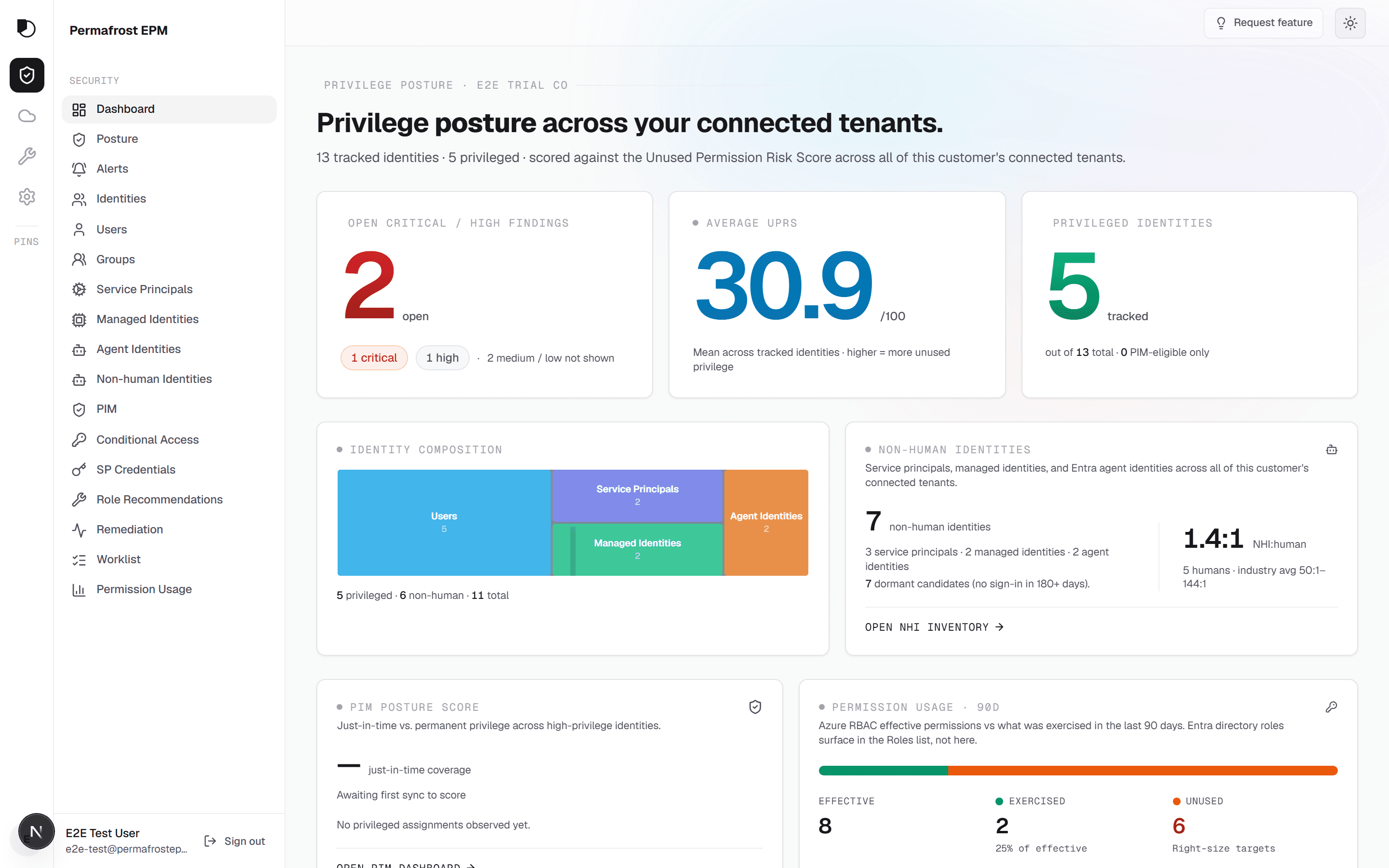
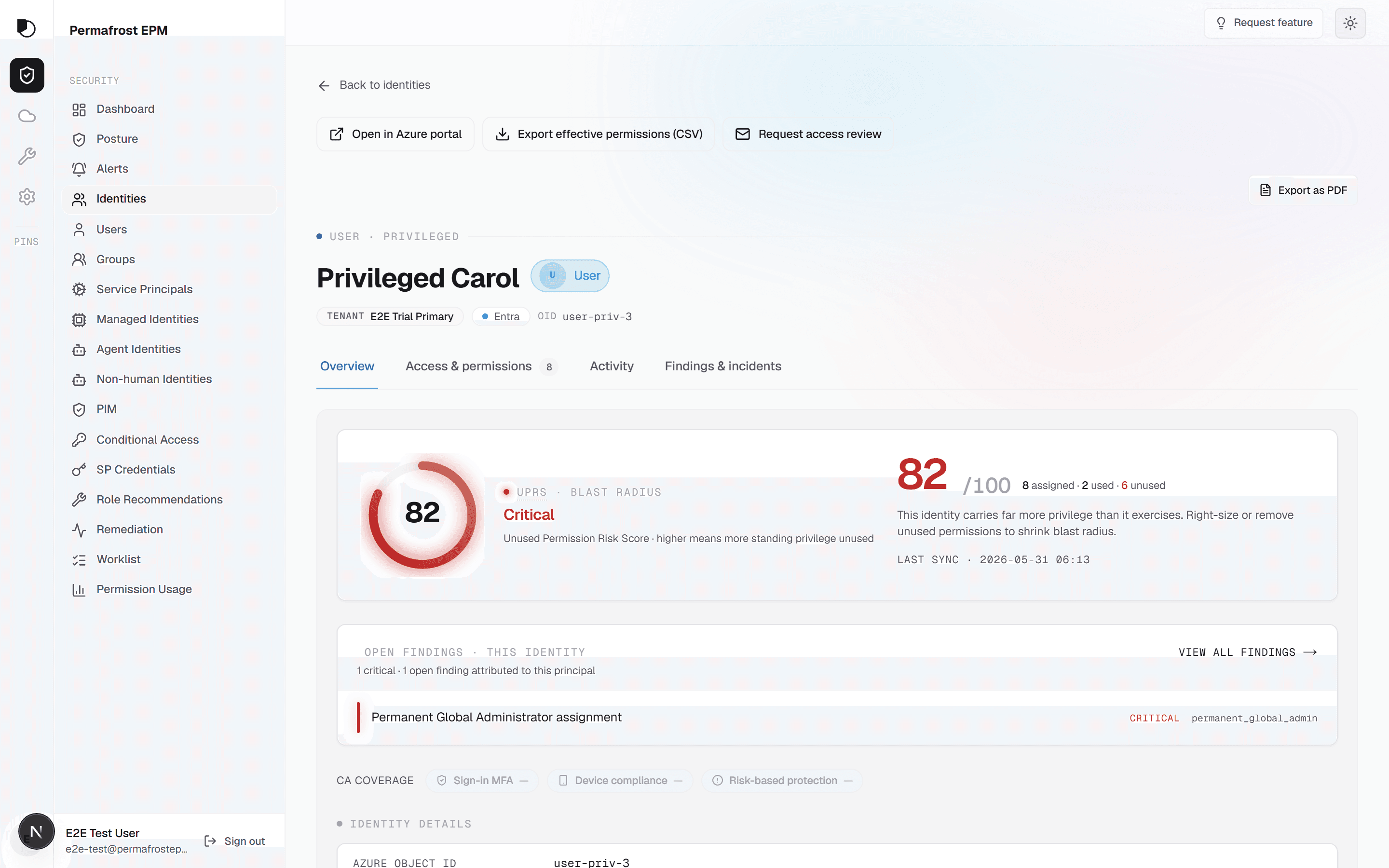
The gap, on one screen.
Coverage by identity class, the per-principal risk waterfall, and standing access for an agent identity. The same surfaces a connected tenant lands on.
See the gap close, end to end.
A short walkthrough: connect a tenant, read the score, drill a finding to its evidence, and walk a risky grant back. No sign-in to press play.
Product demo
A short product walkthrough is in production.
Until it lands, take the same surfaces for a spin in the live demo — read-only, synthetic data, no sign-in.
Try the live demoOne score to add meaning to all.
UPR is the Unified Principal Risk: 0 to 100 per identity, the ratio of permissions granted to permissions exercised over a 90-day window, with additional factors.
- WindowEvery score reads from a rolling 90-day evidence window.
- EvidenceARM activity-log evidence behind every score. No black-box numbers.
- ScopeRBAC-only by design. The score measures what role assignments actually grant.
- TenantTenant-level UPR is the weighted average across every identity.
Every identity.
Class — Human
Employees and guests with Entra ID accounts. Sign-in and ARM activity feed every score.
Class — Service principal
App registrations and automation credentials. The fastest-growing class in most tenants, and the least reviewed.
Class — Managed identity
Workload identities bound to Azure resources. Granted broadly at scope, exercised narrowly in practice.
Class — Agent identity
AI agents acting under their own credentials. A new class with an old problem: standing over-grant.
Severity you can defend.
Every finding drills to the rows behind it: the role assignment, the scope, and the activity-log evidence that proves what was exercised and what never was. When the board asks why an identity is critical, the answer is a query result, not a vendor adjective.
- DrillEach severity chip opens the filtered list it was counted from.
- ProofFindings cite ARM activity-log entries, not heuristics.
Three modes. Zero credentials.
Every recommendation ships with a walk-back path. You choose how much of the work Permafrost does, and none of the modes require it to hold a secret.
Mode 01 — Manual
Guided steps
A precise, scoped runbook for the change: the exact role assignment, the exact scope, the portal path. You stay on the keyboard the whole time.
Mode 02 — Script with preview
Download, review, run
A generated script with a full preview of every action it will take. Review it, diff it, run it from your own shell under your own account.
Mode 03 — Session-only OAuth
Apply in one session
Consent once, apply the change, done. The OAuth access token lives in memory for one hour at most, then it is gone. Permafrost stores zero customer credentials.
Isolation
Tenant isolation by design. Every query, every row, every export is scoped to one customer.
Scope
CIEM, not a SIEM. Permafrost reads entitlements and the evidence that proves their use. It is not a log lake.
Cadence
Minimum 60-minute sync cadence per tenant. No surprise scans, no unannounced load.
Take a core sample.
The first sync is read-only. No card required.
Demo is read-only · synthetic data · no sign-in